


Why Coding Agents Burn So Many Tokens Before Writing Any Code
Presented by Sonar
Coding agents often rely on text search to navigate a codebase, forcing them to shift through irrelevant matches and infer how everything connects. Sonar’s research found that semantic code navigation reduced agent costs by up to 36% by helping agents find the code that actually needs to change.
How Kubernetes Actually Works
Containers solve packaging. They do not solve operations.
They do not decide where applications should run, how many copies should exist, how traffic should reach them, or what happens when a machine fails.
That is where Kubernetes comes in.
Kubernetes turns a group of servers into a programmable platform. You describe the state you want, and Kubernetes continuously works to make reality match it.
How Kubernetes works
In Kubernetes, you create objects that describe the outcome you want.
For example: “Run three copies of this web application.”
Kubernetes stores that request, schedules the workloads, starts the containers, monitors their health, and replaces them when they fail.
The important detail is that Kubernetes does not treat deployment as a one-time event. It treats the cluster like a constantly drifting system that must be corrected over time.
That correction loop is called reconciliation.
Reconciliation means continuously comparing desired state with actual state, then taking action to close the gap.
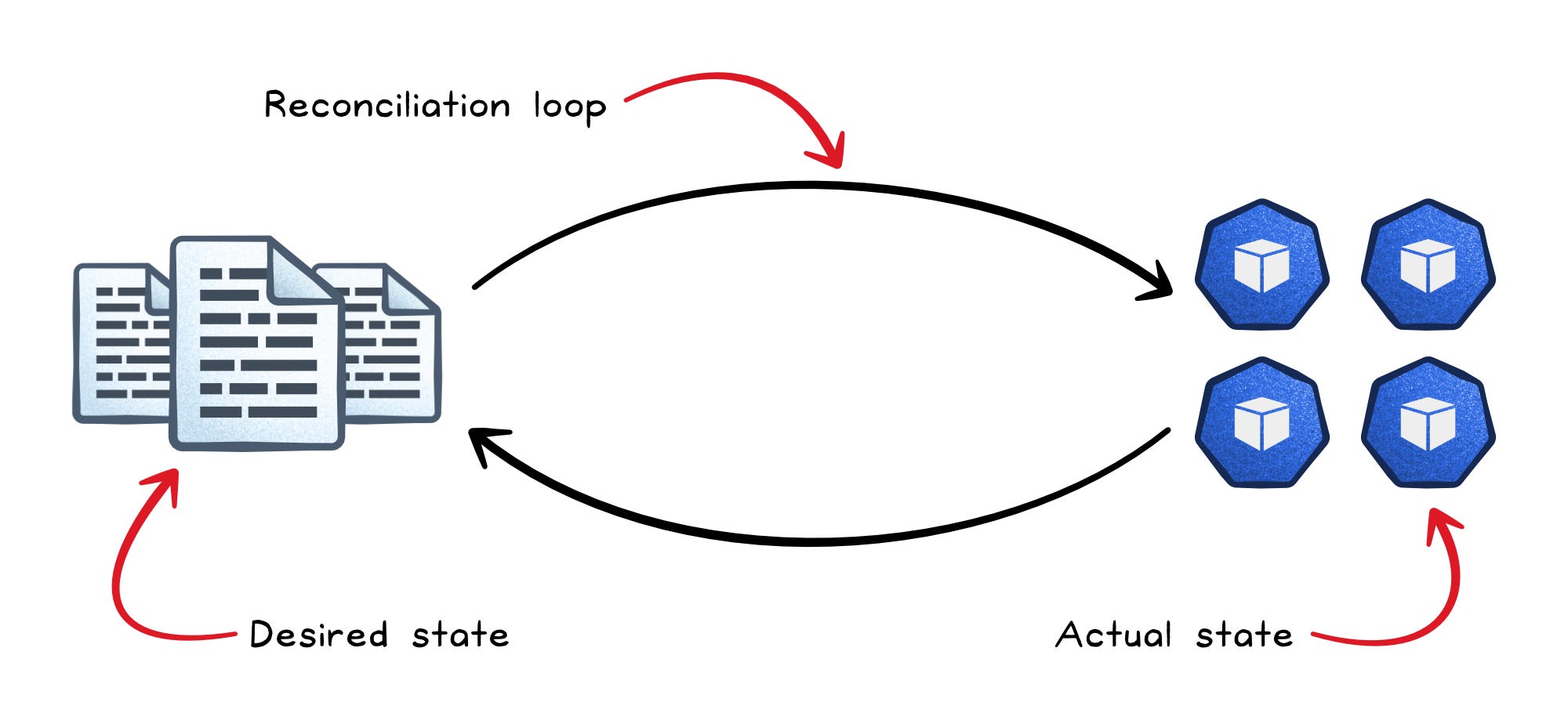
If you ask for three Pods and one crashes, Kubernetes notices that only two remain. Because the desired state still says three, it creates another Pod automatically.
A Pod is the smallest deployable unit in Kubernetes. It usually contains a single container, but it can also contain multiple tightly coupled containers that share networking and storage.
The architecture
A Kubernetes cluster splits into two halves.
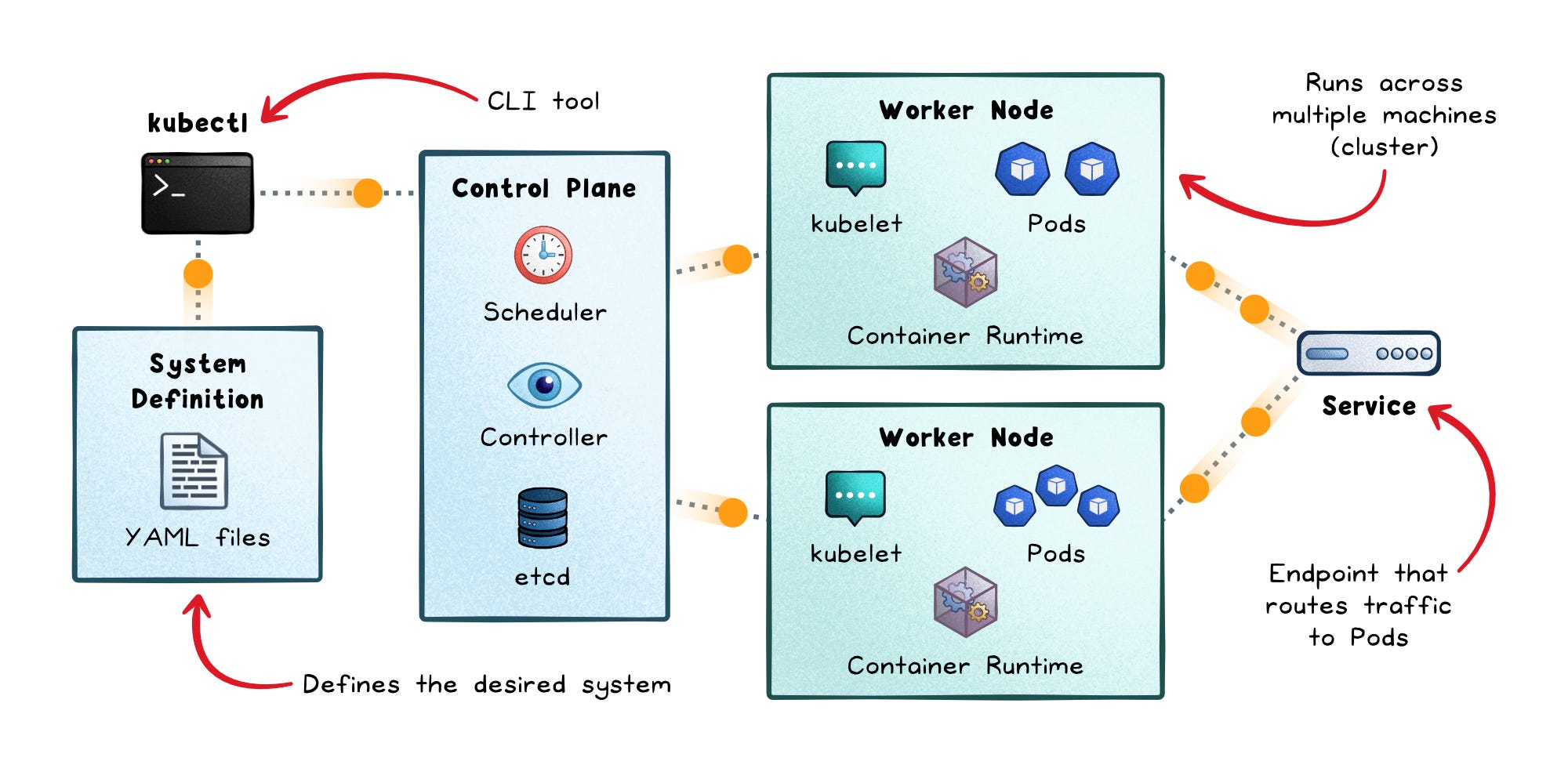
The control plane holds intent and policy:
API server → The central entry point for cluster operations; components read and write cluster state through it rather than accessing etcd directly.
etcd → A strongly consistent distributed key-value store that holds all cluster state; if etcd becomes unhealthy, no new state changes can be committed.
Scheduler → Watches for unplaced Pods and runs a filter-then-score process to bind each one to the best available node.
Controller manager → Runs built-in control loops (replication, endpoints, namespaces) that continuously compare desired vs. actual state.
The worker nodes make intent real:
kubelet → The node agent; it watches PodSpecs assigned to its node and ensures containers are running and healthy.
kube-proxy → Programs local network rules so traffic sent to a Service IP reaches the actual Pod backends.
Container runtime → The engine (containerd, CRI-O) that starts and stops containers when kubelet asks.
Most Kubernetes components do not coordinate by calling each other directly. They communicate through the API server and shared state. That design makes the system easier to extend, inspect, and automate.
What happens during a deployment
The easiest way to understand Kubernetes is to follow a single request through the system.
If you deploy an application with three replicas, Kubernetes roughly follows this flow:
You submit a Deployment object to the API server
The desired state is stored in etcd
Controllers create the ReplicaSet and Pods needed to match that desired state
The scheduler selects worker nodes for the Pods
kubelet tells the container runtime to start the containers
kube-proxy configures Service routing so traffic can reach the appropriate Pods
Controllers continuously monitor the cluster and reconcile drift
This is what makes Kubernetes feel self-managing.
You declare the outcome you want, and multiple control loops continuously work together to keep the cluster moving back toward that state whenever reality changes.
Networking, scheduling, storage, and security
Kubernetes does much more than just run containers.
It constantly solves four core problems: how workloads communicate, where they run, how they keep data, and how they stay secure.
Networking
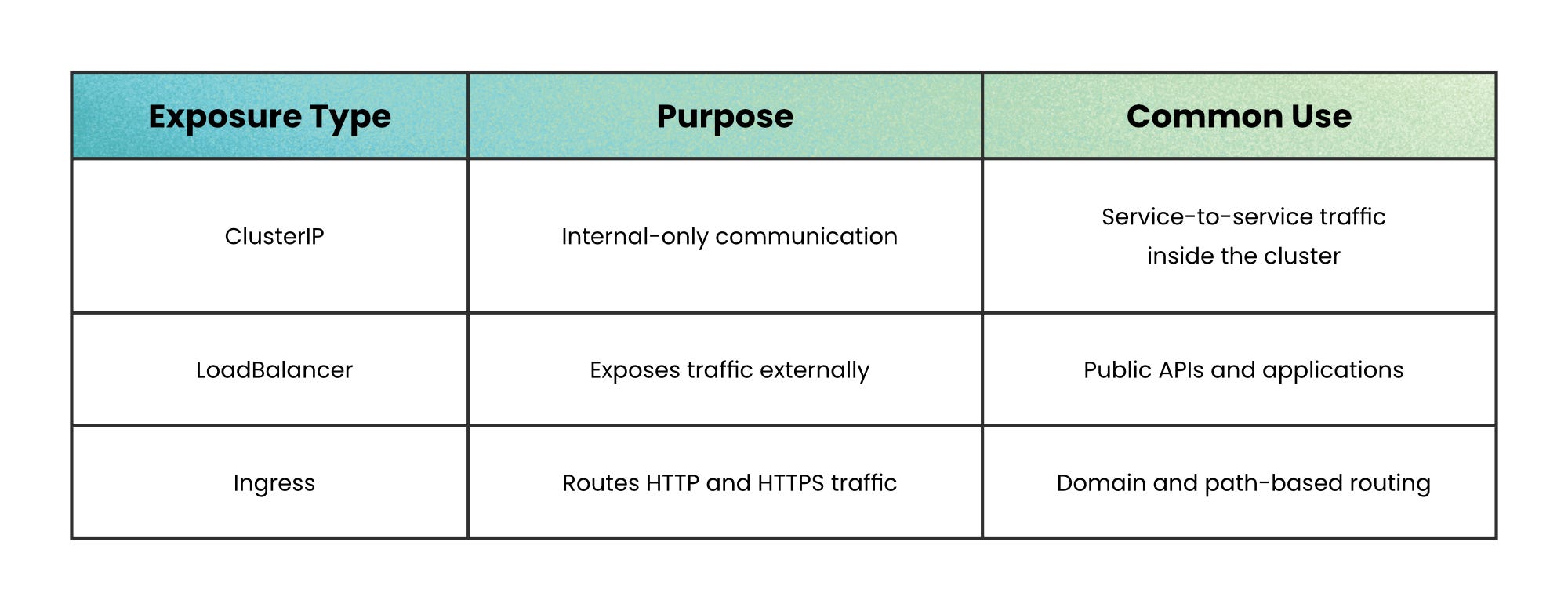
Pods are temporary, so Kubernetes uses Services to give workloads a stable network identity. The Pods behind a Service may change, but clients keep calling the same name.
A frontend can call payments-service without knowing which payment Pod is currently alive.
Storage
Pods can disappear, but data should not.
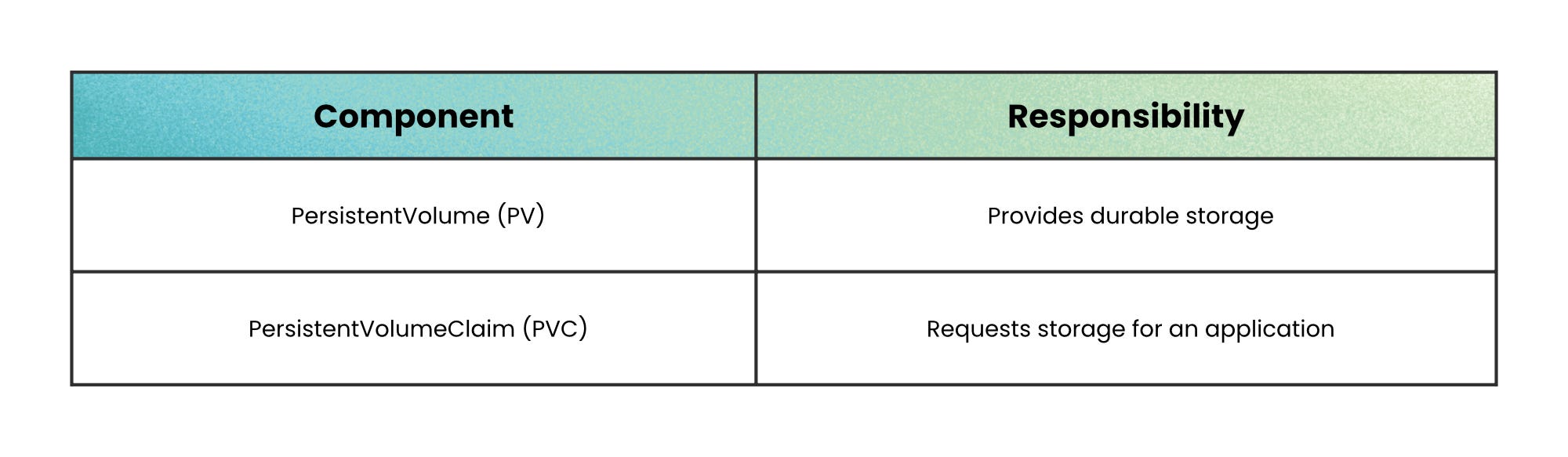
PersistentVolumes provide durable storage, while PersistentVolumeClaims let applications request the storage they need. Kubernetes then binds workloads to the appropriate storage automatically.
This allows a database Pod to move between nodes without losing its data.
Scheduling
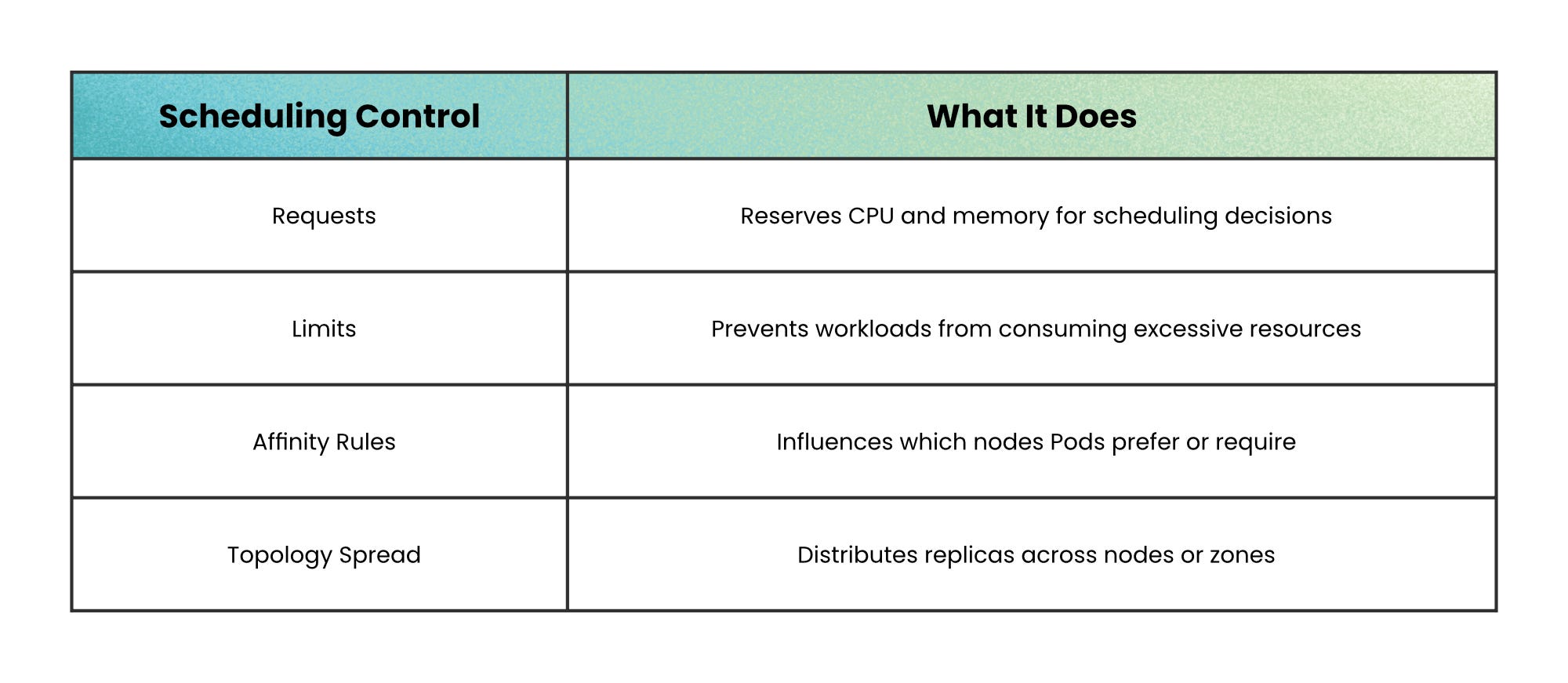
The scheduler decides where Pods run. It filters out unsuitable nodes, then selects the best remaining option based on resources and placement rules.
Good scheduling depends on accurate resource requests. Kubernetes cannot place workloads intelligently if every application underestimates or overestimates its needs.
Security and health
Security starts at the API layer. RBAC controls who can perform actions inside the cluster, while Pod security restricts what containers are allowed to do.
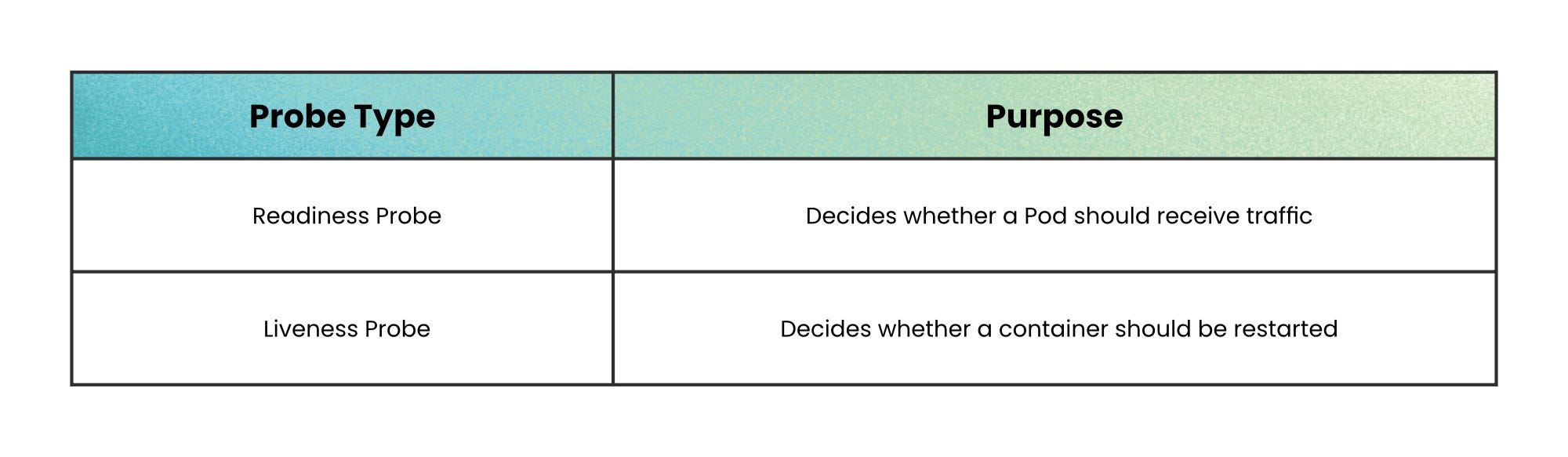
Kubernetes also continuously monitors workload health to decide whether traffic should reach a Pod or whether a container should restart.
Together, these systems allow Kubernetes to behave like a self-managing platform instead of just a container runner.
When not to use Kubernetes
Kubernetes is powerful, but it is not free.
Avoid it when the operational cost is larger than the problem it solves.
Small app, simple traffic → A single VM or managed app platform may be easier.
Few services → The orchestration layer may add more complexity than value.
No platform expertise → Misconfigured clusters create security and reliability risks.
Mostly managed services → You may not need to run much compute yourself.
Short-lived prototype → Speed matters more than platform flexibility.
Kubernetes becomes valuable when operational coordination becomes harder than application development.
Wrapping up
Kubernetes does not make distributed systems simple. It makes them manageable.
It gives you a common way to describe applications, place workloads, expose services, attach storage, and recover from failure. The value is not that nothing breaks. The value is that when something breaks, the system has a loop that knows what “healthy” should look like and works its way back.
That is the real mental model: Kubernetes is not just running containers. It is continuously steering a cluster toward the state you declared.
👋 If you found this useful → Like + Restack to help others learn system design.