
Infrastructure as Code Clearly Explained
(6 min read) | The IaC workflow that actually works, why it matters in practice, security risks you can't ignore, and more...


Postmortems Without the Reconstruction Work
Presented by incident.io
Writing postmortems is traditionally slow, painful, and often incomplete. Sometimes they don’t get written at all. That’s not just a process problem, it’s an experience problem. incident.io flips this by generating a draft from real incident data, so teams start with context and focus on refining what matters. It turns postmortems into a structured, collaborative workflow that’s actually easy to complete.
Infrastructure as Code Clearly Explained
Can you rebuild your entire production environment from scratch today?
Not approximately. Not “close enough.” Exactly as-is.
If the answer is no, your infrastructure depends on tribal knowledge, console history, or luck.
Infrastructure as Code (IaC) replaces all three with something far more reliable: versioned, reviewable definitions that can be applied again and again without surprises.
What Infrastructure as Code actually means
Infrastructure as Code (IaC) is the practice of defining infrastructure in machine-readable files instead of configuring it manually in consoles or through one-off scripts.
There are two closely related disciplines:
Provisioning IaC → Defines cloud resources such as networks, IAM roles, compute instances, and managed services.
Configuration IaC → Defines the desired state of machines and services, such as installed packages, files, and system settings.
Provisioning creates the building.
Configuration furnishes and maintains it.
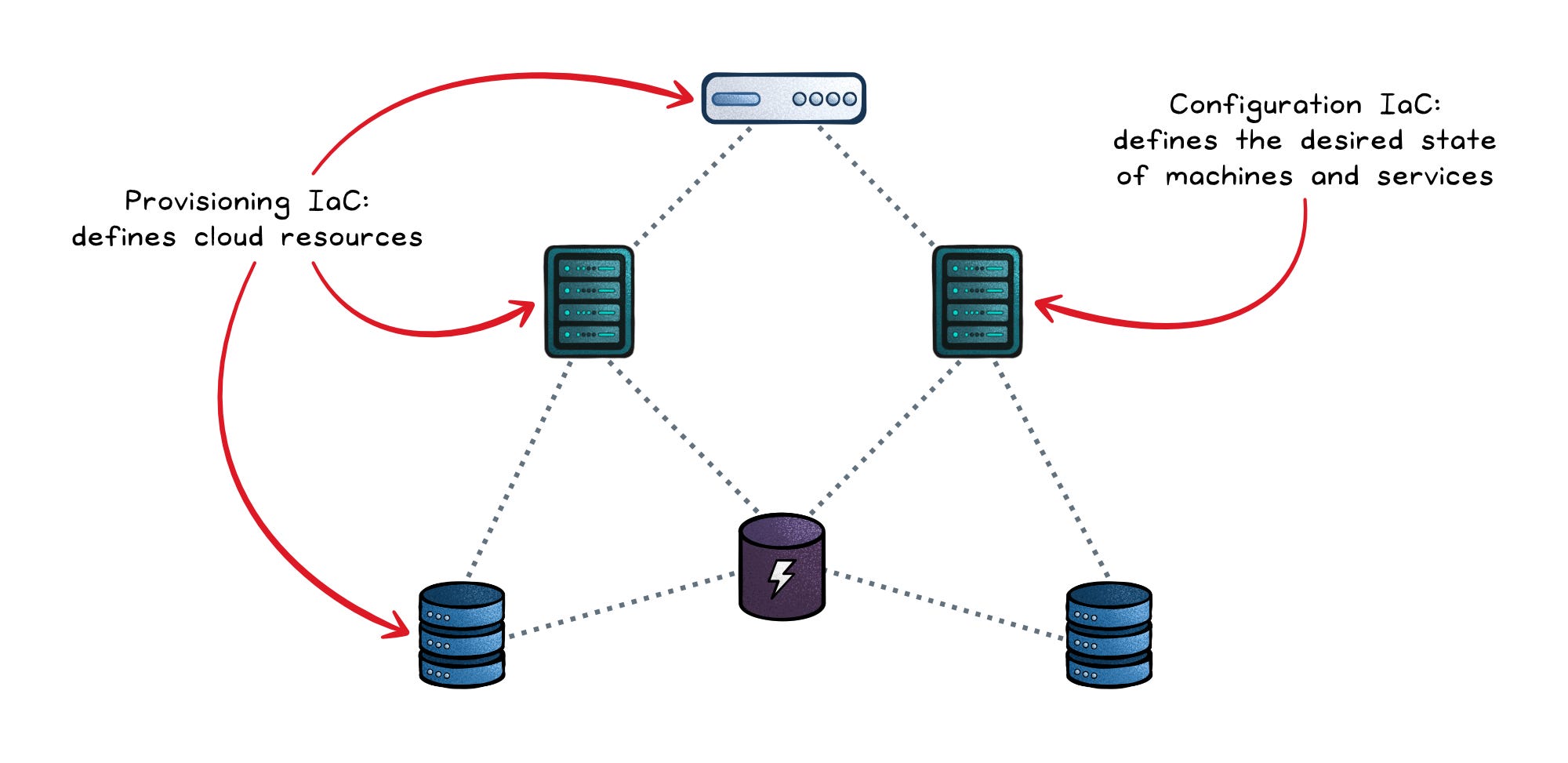
Both aim at the same outcome: desired state and convergence. You describe what should exist, and a tool calculates the steps required to make reality match that description.
Infrastructure stops being something you “set up” and becomes something you declare, review, and reapply safely.
Why it matters in practice
The benefits of IaC flow directly from treating infrastructure like code.
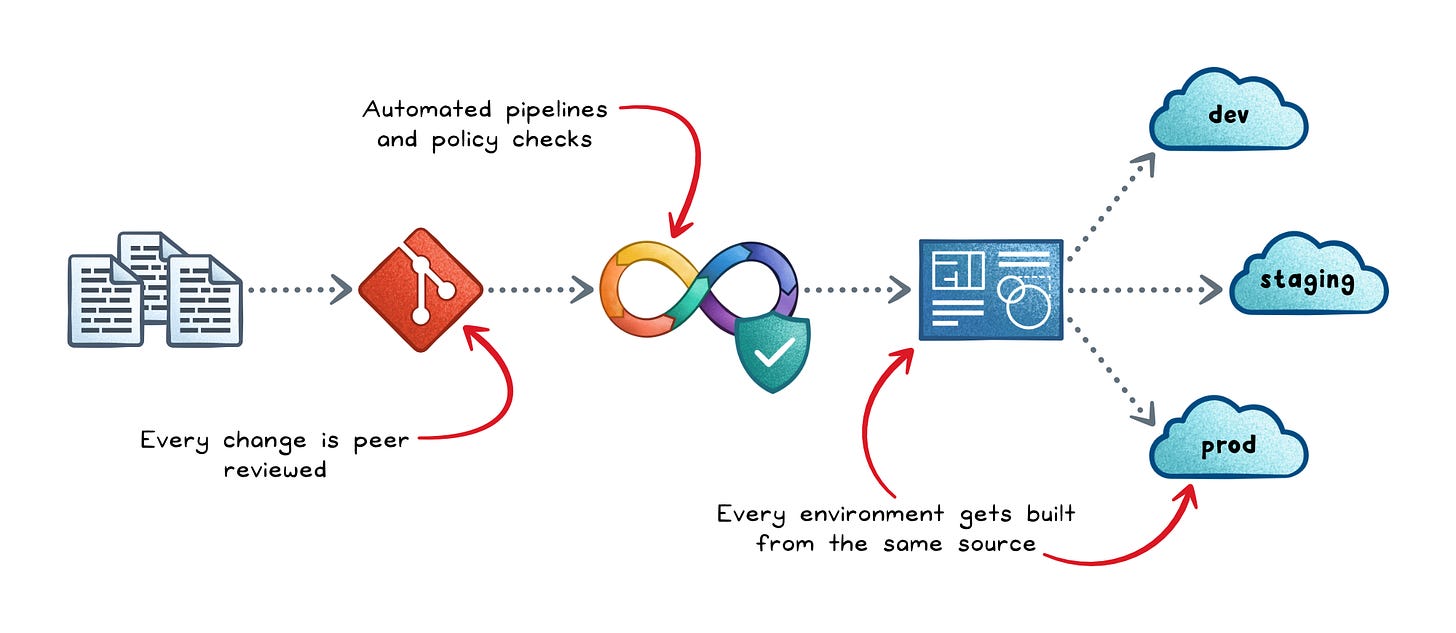
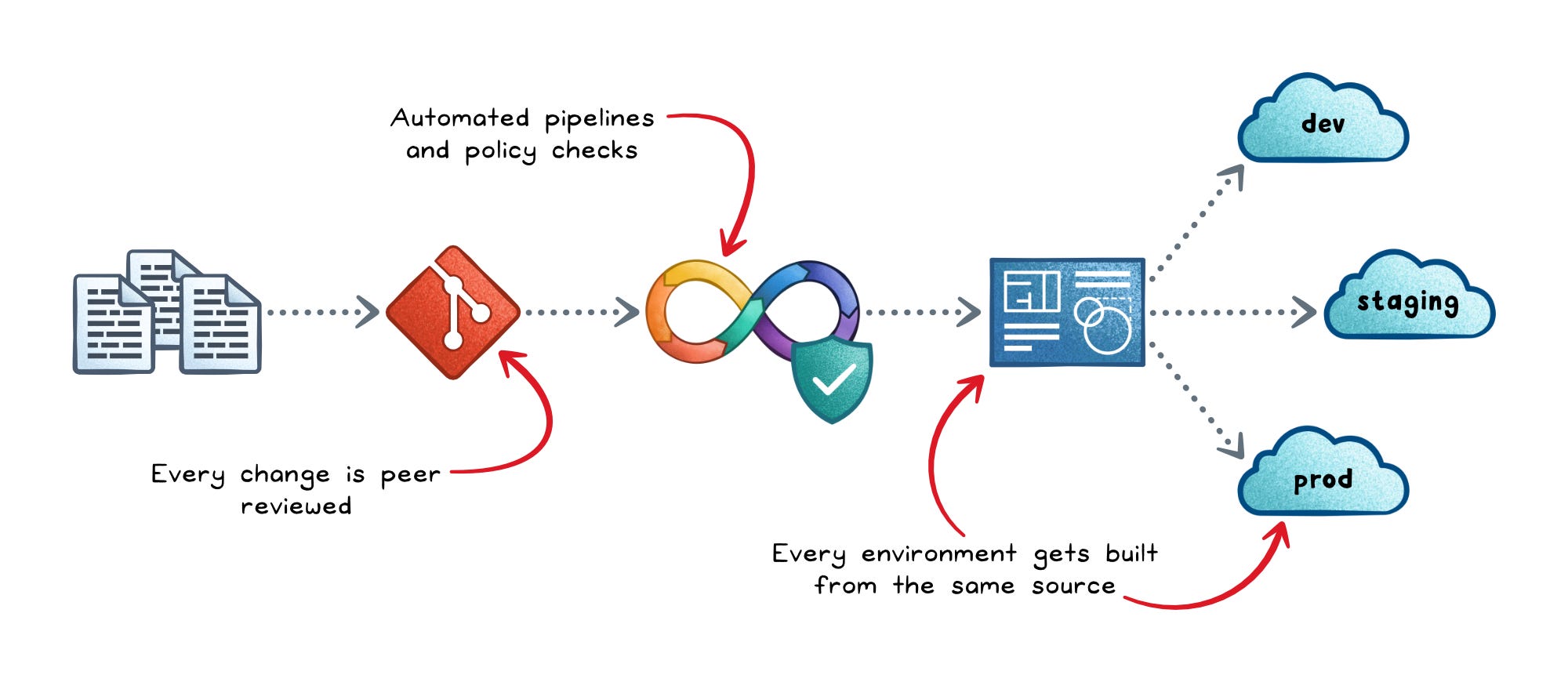
Reproducibility → Every environment gets built from the same source, eliminating the “works on my machine” problem at the infrastructure level.
Auditability → Every change goes through version control and peer review, so you always know who changed what, when, and why.
Faster, safer delivery → Automated pipelines with preview steps replace manual deploys, so teams ship more often with less risk.
Scalable governance → Policy checks run before anything is provisioned, so compliance rules are enforced automatically rather than audited after the fact.
Without IaC, every environment eventually diverges in small, invisible ways. That divergence is the root cause of a wide range of production incidents.
Choosing a tool
The tool choice depends on your context more than on which tool is “best.” Here’s a practical breakdown:
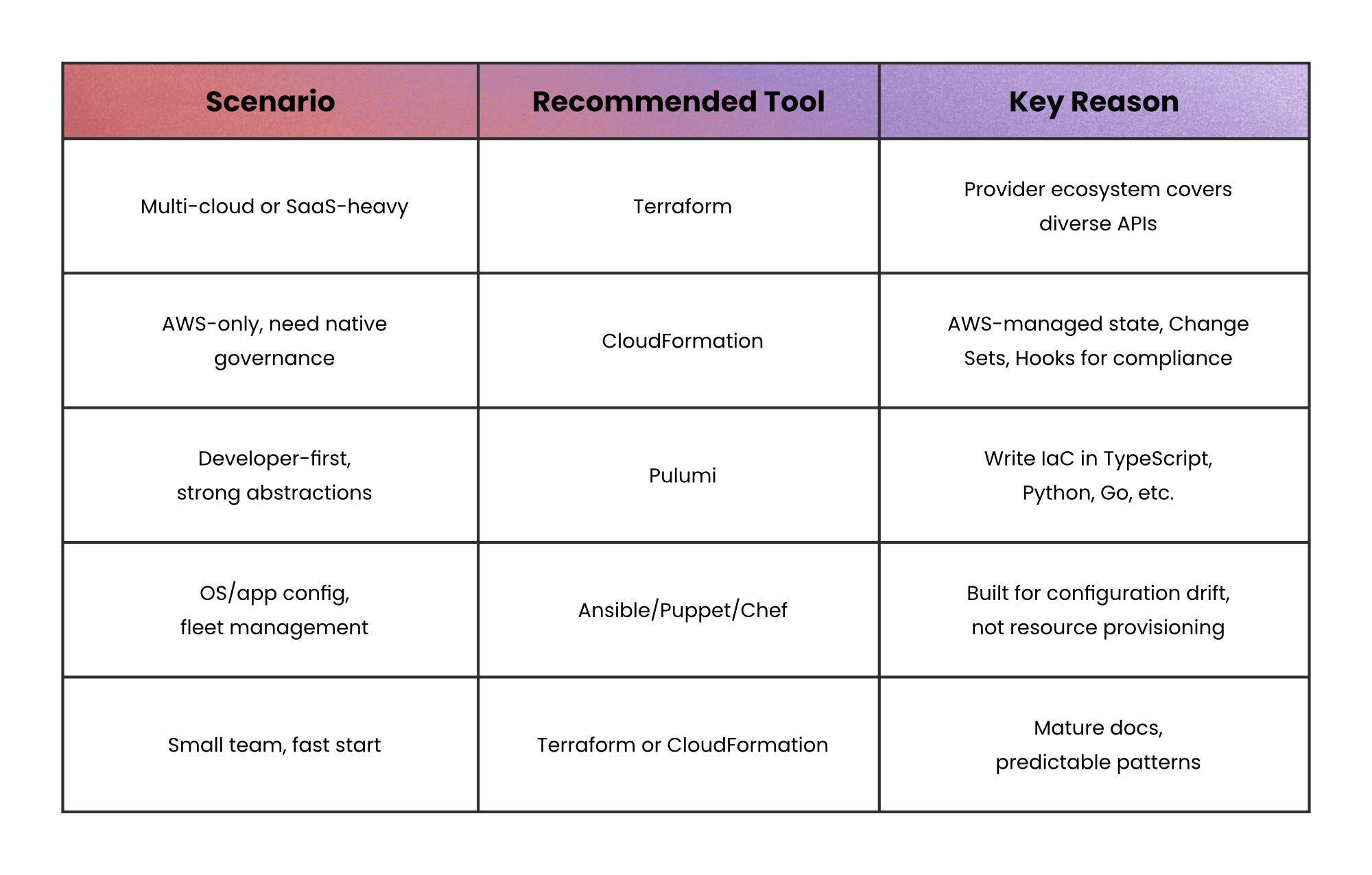
The common pattern in large organizations is to use Terraform or CloudFormation to provision the infrastructure; and Ansible for OS hardening, package installs, and app configuration.
The IaC workflow that actually works
Effective IaC is less about which tool you use and more about the workflow controls around it.
Most failures don’t come from syntax; they come from skipping validation, review, or safe rollout.
Here’s what a robust pipeline typically looks like:
Developer writes and pushes IaC to Git → Infrastructure is defined as code (networks, databases, IAM, etc.), making Git the single source of truth.
CI runs validation checks → Formatting, syntax validation, linting, and dependency checks ensure the code is correct and consistent.
Security & policy checks run → Misconfiguration scanners, policy-as-code rules, and security tools catch risky permissions or unsafe defaults early.
A preview (plan) is generated → The system compares desired vs current state and shows exactly what will be created, updated, or deleted before anything changes.
Peer review and approval → Engineers review both the code and the plan to catch issues like accidental deletions, cost spikes, or overly broad access.
Apply via a deployment pipeline → A trusted CI/CD runner applies the changes, ensuring consistent execution and controlled credentials.
Environment-specific config is injected → The same code is reused across dev, staging, and prod, with differences handled through variables and separate state.
Post-deploy checks run → Smoke tests, connectivity checks, and monitoring validation confirm the system actually works after deployment.
Environment rollout → Changes move from dev → staging → production with increasing levels of approval to reduce risk.
State is updated for future runs → The IaC tool records what exists so future changes can safely build on top of it.
Continuous drift detection → Scheduled checks alert when real infrastructure diverges from what’s defined in code.
A simple way to think about it: you declare what you want, the pipeline proves it’s safe, and automation makes it real; consistently, every time.
The security risks you can’t ignore
IaC security failures tend to be systemic: fast pipelines amplify mistakes quickly.
These are the three most dominant risk categories.
1. Secrets exposure
Secrets exposure in IaC happens when sensitive data (like passwords or API keys) is stored or leaked through code, state files, logs, or pipelines.
This can lead to serious risks.
Prevent it by using secret managers, encrypting state, avoiding hardcoding, and enforcing least-privilege access.
2. Over-privileged automation
CI/CD pipelines often get broad permissions “just to make it work.”
Instead, the right model separates preview roles from apply roles, scope permissions per environment, and enforces least privilege.
3. Supply chain integrity
Compromised or untrusted external modules, templates, or dependencies are a quiet attack surface.
If these components are tampered with, they can introduce vulnerabilities or malicious code into your infrastructure.
Without pinning and verification, your infrastructure depends on unverified external code.
When not to use full IaC automation
IaC is almost always worth adopting, but the level of automation should match your maturity.
Full automated apply-on-merge makes sense when you have strong test coverage, good observability, and practiced runbooks. Without those foundations, it moves fast in the wrong direction.
For small prototypes or rarely-changed legacy systems, basic version-controlled templates with manual apply still deliver most of the value: reproducibility, auditability, and the ability to review changes before they land.
The pitfalls teams hit first
A few failure patterns show up reliably when teams adopt IaC without the right habits.
State mishandling → Storing Terraform state locally, or in source control, leads to conflicts and leaks. Use a remote backend with locking from day one.
Configuration drift → An urgent fix applied via the console creates a gap between reality and the definition. Enforce a norm: no manual changes without a follow-up pull request, and run drift detection on a schedule.
Unsafe changes → A small template edit can silently force a resource replacement. Preview gates and policy-as-code checks catch this before it reaches production.
Skipping validation → Treating IaC as “just YAML” and skipping linting and formatting in CI creates a debt that compounds fast.
Recap
IaC is not a tool you adopt; it’s a discipline you commit to.
The tools (Terraform, CloudFormation, Pulumi, Ansible) are expressions of a single idea: infrastructure should be reproducible, reviewable, and automatable by default.
Start with version control and validation. Add preview gates before you automate applies. Lock down secrets and pipeline permissions early.
When IaC is done well, provisioning an environment feels like merging a pull request; not like defusing a bomb.
👋 If you liked this post → Like + Restack + Share to help others learn system design.