
Vector Databases Clearly Explained
The mental model that makes vector databases click.

Build AI Apps with MongoDB
Presented by MongoDB

Looking to stay ahead of the curve on AI? MongoDB AI Learning Hub has the technical training pathways and tools you need to level up your AI app-building game. Explore practical guides, tutorials, and quick starts for all skill levels, from foundational concepts like understanding AI tool stacks to advanced implementations using RAG, Atlas Vector Search, and LLM optimization.
Vector Databases Clearly Explained
Your users type a question in plain English.
Your search returns results that match the words but miss the meaning.
You add more keywords to the query, tune the weights, and it still feels wrong. Your search engine is treating meaning like a keyword problem.
And that’s the key difference: traditional databases search for matching values, while vector databases search for nearby meaning.
That distinction is the architectural shift behind modern AI-powered search.
What a vector database actually stores
A vector is just an ordered list of numbers, like [0.12, -0.45, 0.89, ...] stretched across hundreds or thousands of dimensions. An embedding is a vector produced by a machine learning model so that similar things end up close together.
For example, the sentences “reset my password” and “I forgot my login” may look different as text, but a good embedding model places them near each other because they mean similar things.
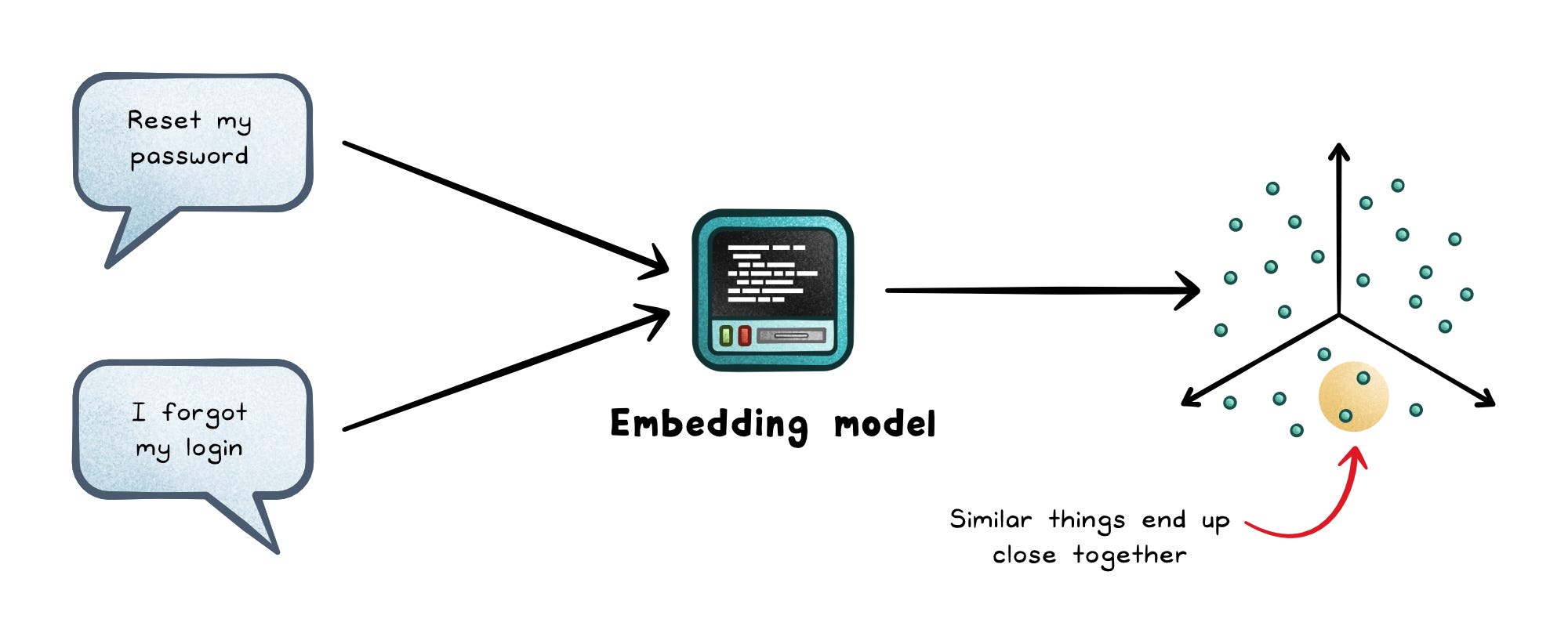
A regular database can store vectors, but a vector database is built to search them quickly, filter them safely, and rank them by similarity at scale.
A vector database stores those embeddings alongside useful context:
ID → The stable reference back to the original item.
Vector → The embedding used for similarity search.
Metadata → The fields used for filtering, permissions, and ranking.
Source content → The original text, image, document, or a pointer to where it lives.
That metadata matters because real searches rarely ask, “Find anything similar.” They ask, “Find similar support articles for this customer, in English, updated this year, that this user can access.”
So the vector database is not just matching meaning. It is combining similarity, filtering, and ranking into one retrieval path.
How vector search works
Traditional databases are great at exact lookups. You ask for user_id = 123, and the database finds that row.
Vector search is different.
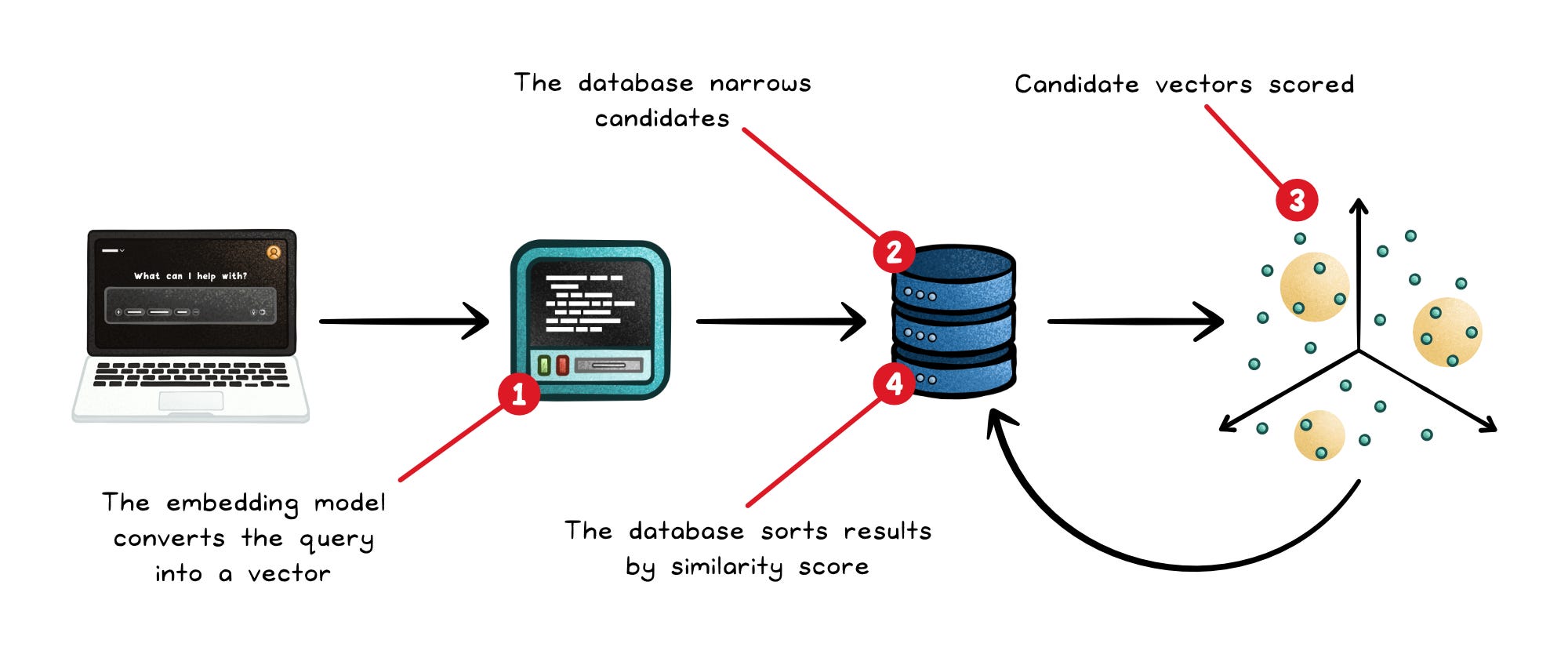
You give the database a query vector, and it looks for nearby vectors. “Nearby” depends on the distance metric, which is the math rule used to compare vectors.
Common metrics include:
Cosine similarity → Compares vector direction, not size. Common for text embeddings because similar sentences can point the same way even with different magnitudes.
Euclidean distance → Measures straight-line distance between vectors. The smaller the distance, the more similar the vectors.
Dot product → Measures direction and magnitude together. Useful when the embedding model treats larger vector values as meaningful.
Use the metric your embedding model expects.
If the model was trained for cosine similarity and you search with the wrong metric, relevance can drop even if the database is working correctly.
The embedding model defines the map. The vector database only helps you navigate it.
Exact vs approximate search
The simplest vector search is exact nearest-neighbor search.
The database takes your query vector, compares it against every stored vector, ranks the results, and returns the closest matches. It is accurate because nothing gets skipped.
But accuracy has a cost.
As the dataset grows, comparing against every vector becomes too slow and too expensive. Searching 10,000 vectors is manageable. Searching 100 million vectors this way is not.
That is why production vector databases usually use approximate nearest-neighbor search, or ANN. ANN does not promise to always find the mathematically closest results. Instead, it finds results that are close enough, much faster.
For example, a support chatbot does not always need the mathematically closest document. It needs a document that answers the user’s question quickly and reliably.
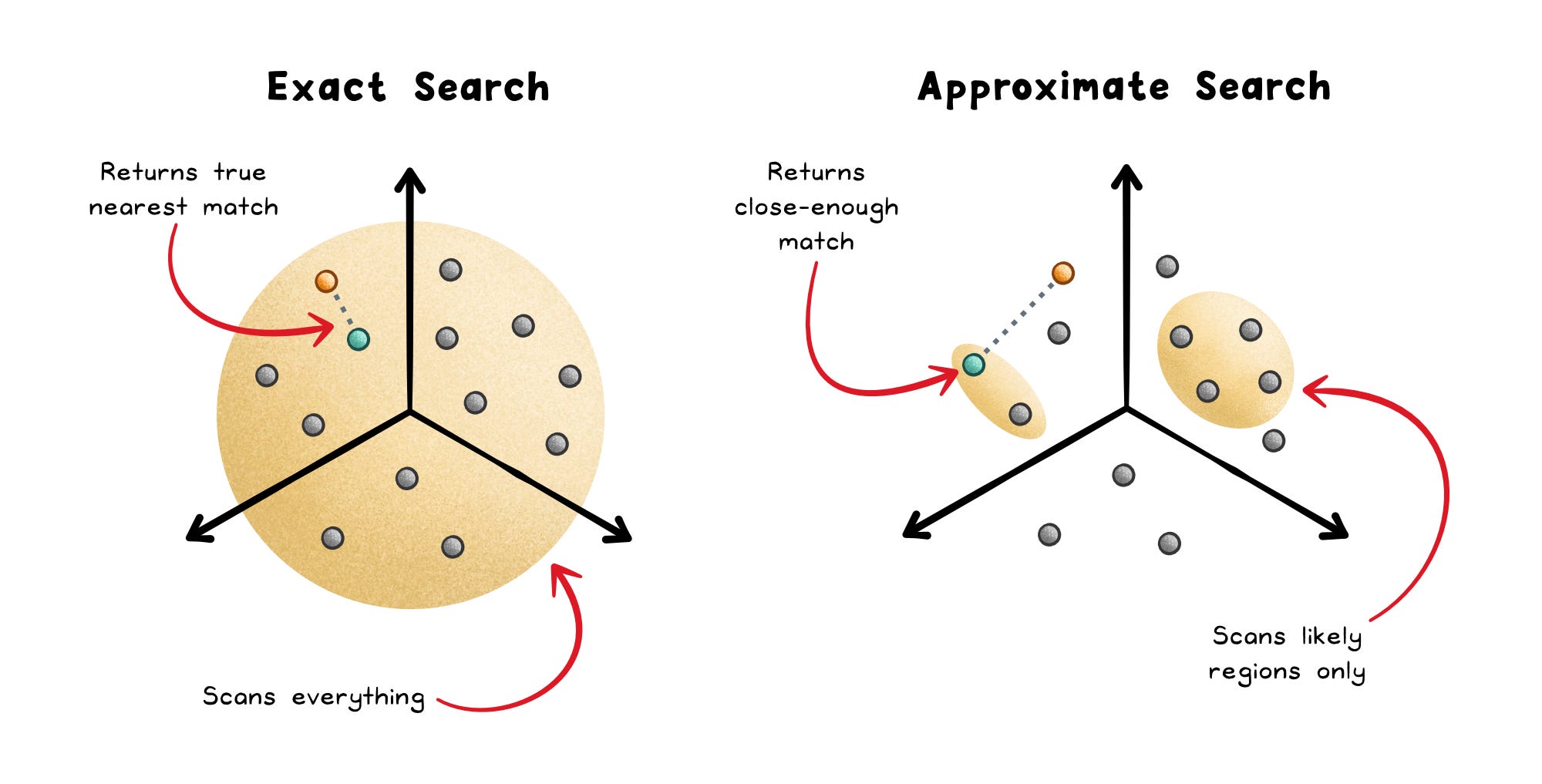
Most production vector databases use ANN as their default. The important nuance is that “ANN versus exact” is not a once-per-database choice; it can be a per-query decision.
Some systems fall back to exact search automatically when filters make the candidate set small enough. The database is not changing its philosophy. It is choosing the cheaper path for the query in front of it.
Approximate search works because the database builds an index ahead of time. The index gives the database a faster path through the vector space, so it does not need to scan everything for every query.
How vector indexes speed up search
A vector database does not always compare your query against every stored vector.
That would be accurate, but slow. As the dataset grows, the database needs a shortcut: an index, which is a data structure that narrows the search space so similar vectors can be found faster.
Different index types make different tradeoffs between speed, recall, and memory.
Recall means “how often the search returns the true nearest results.” Higher recall usually means better relevance, but it often costs more latency or memory.
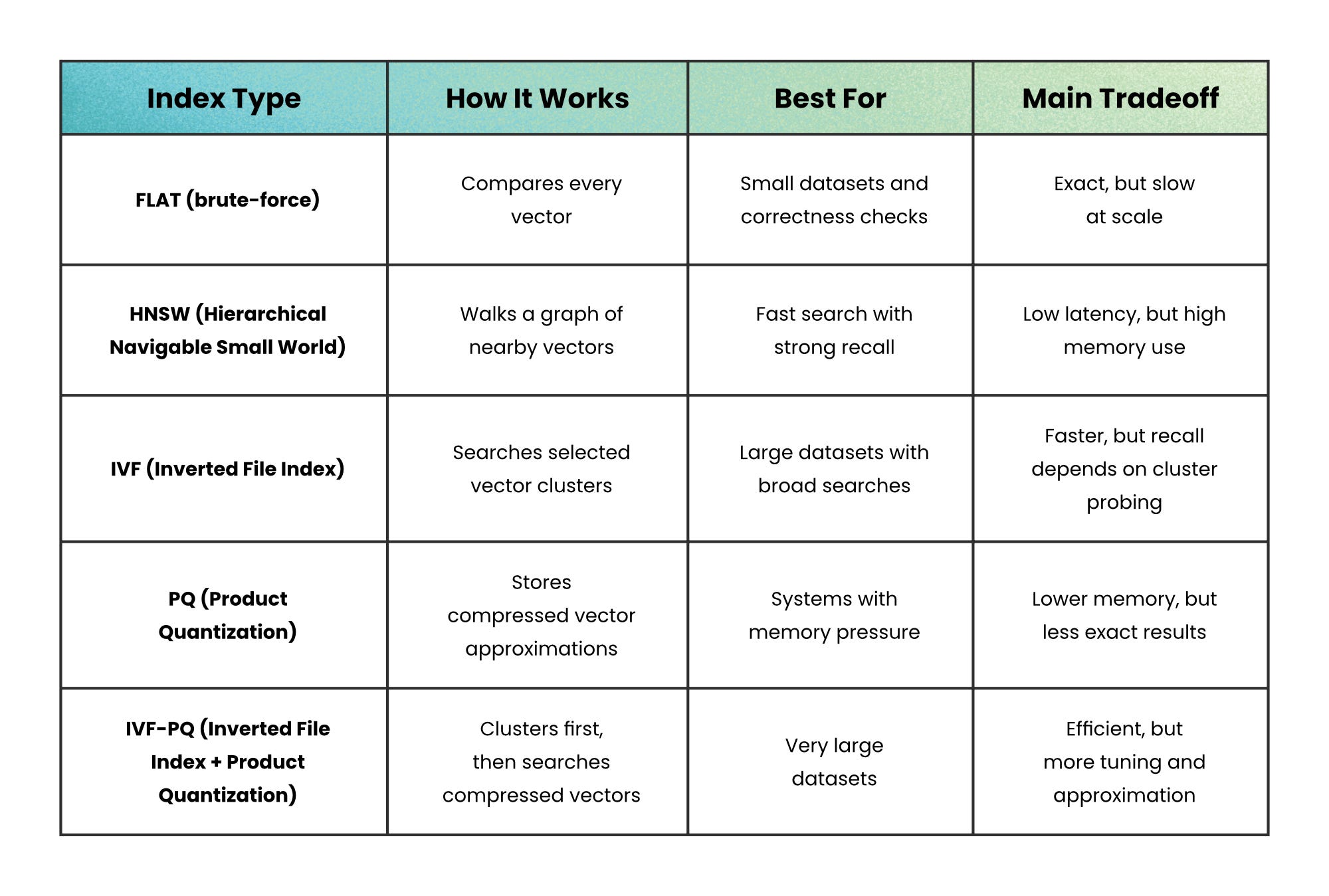
In practice, HNSW is the default workhorse because its speed-to-recall balance is strong for many production systems.
But it is not always the right answer.
When memory cost becomes the bottleneck, PQ or IVF-PQ can be a better fit because they shrink the vector footprint.
Choose based on your bottleneck: use HNSW when latency matters most; use PQ when memory cost matters most.
Production tradeoffs
Vector databases look simple in demos.
You embed the data, store the vectors, run a search, and return the closest results. But production systems have more moving parts.
New records may not be searchable immediately. Indexes may build in the background. Replicas may lag behind writes. Metadata filters may also change the best search path for each query.
That is why a vector database should usually be treated as a retrieval index, not the main source of truth.
Keep the canonical data in your primary database. Store vectors as a derived view of that data.
This gives you room to rebuild indexes, change embedding models, recover from lag, and compare approximate results against an exact baseline.
A strong production setup tracks:
Model version → Embeddings from different models may not behave the same, so avoid mixing them without a migration plan.
Write freshness → New or updated records may take time to appear in search, so the app should not assume instant visibility.
Filter behavior → Metadata filters can speed up retrieval, but they can also make some queries slower depending on the index and candidate set.
Recall and latency → Fast results do not help if the database misses the documents the user actually needs.
Privacy risk → Embeddings are derived from data, but they can still reveal information about the original text, behavior, or documents.
Keep the source of truth in your primary database, and use vectors as a searchable layer on top.
When not to use a Vector Database
A vector database is not the answer to every search problem.
Do not reach for one when exact structure matters more than similarity.
Exact transactional lookup → Use a relational or key-value database because IDs, constraints, and writes matter more than semantic closeness.
Range queries → Use an ordered index because vector search organizes by similarity, not by business order.
Small static datasets → Use brute-force search or a simple library because a full database may add unnecessary operational weight.
Poor embeddings → Fix the model or data pipeline first because no index can rescue bad vector geometry.
Strict fresh reads → Use a system with stronger consistency guarantees because some vector indexes update asynchronously.
Vector databases shine when “close enough in meaning” is the right question. They struggle when the real question is “exactly this,” “strictly ordered,” or “immediately consistent.”
Wrapping up
Vector databases change what search can mean.
You no longer need users to type the exact words that appear in your data. You can search by meaning, similarity, behavior, or context.
But meaning-based search is only as good as the system around it. The embedding model shapes what “similar” means. The index controls the speed and accuracy tradeoff. The production setup determines whether results stay fresh, reliable, and safe.
Use vector databases when “nearby” is the right question. Use something else when “exact,” “ordered,” or “immediately consistent” matters more.
👋 If you found this useful → Like + Restack to help others learn system design.
Thank you for this amazing article.