
MCP Clearly Explained
Plus: Big upgrades are coming to LUC. Vote on what you'd like to see first.


🚀 What's Next for LUC
We're building LUC into a world-class resource for learning system design.
To get there, we’re introducing several new content series over the coming months:
✓ System Design Case Studies
Real-world analyses of how systems at companies like Netflix, Uber, Anthropic, and Amazon are designed.
✓ System Design Deep Dive Series
Deeper, more extensive breakdowns than our regular articles.
✓ AI Engineering Breakdowns
Clear, high-signal breakdowns of AI engineering concepts that can be consumed in ~5 minutes.
✓ AI Engineering Deep Dive Series
Deeper, more extensive breakdowns than our regular articles of AI engineering concepts.
✓ Learning Tracks
Curated learning paths that connect related concepts into structured journeys across system design, AI engineering, and software engineering.
We’d love your input.
We’ll use the results to help prioritize what we build next. Thanks for being part of the LUC community. We’re excited to share what’s coming next!
What MCP Actually Is and Why It Matters
How many custom integrations does your AI stack have?
One for the database, one for Slack, one for the internal knowledge base; each written from scratch, each maintained separately.
Add a new model and the count multiplies again.
Model Context Protocol (MCP) is Anthropic’s answer to that problem.
Rather than building a new connector for every model-tool pairing, MCP defines a single standard interface so any compliant AI host can speak to any compliant server. Add a new tool once, every model that supports MCP can use it immediately.
Understanding how MCP works and where it fits changes how you design AI systems.
What is MCP?
Model Context Protocol (MCP) is a standard way for an AI application to talk to external services.
Instead of inventing a new integration pattern for each tool, MCP defines a common protocol for discovering capabilities, requesting data, and invoking actions.
But it doesn’t stop at message formats.
MCP also defines how a session is established, what features are allowed, and how both sides stay compatible over time.
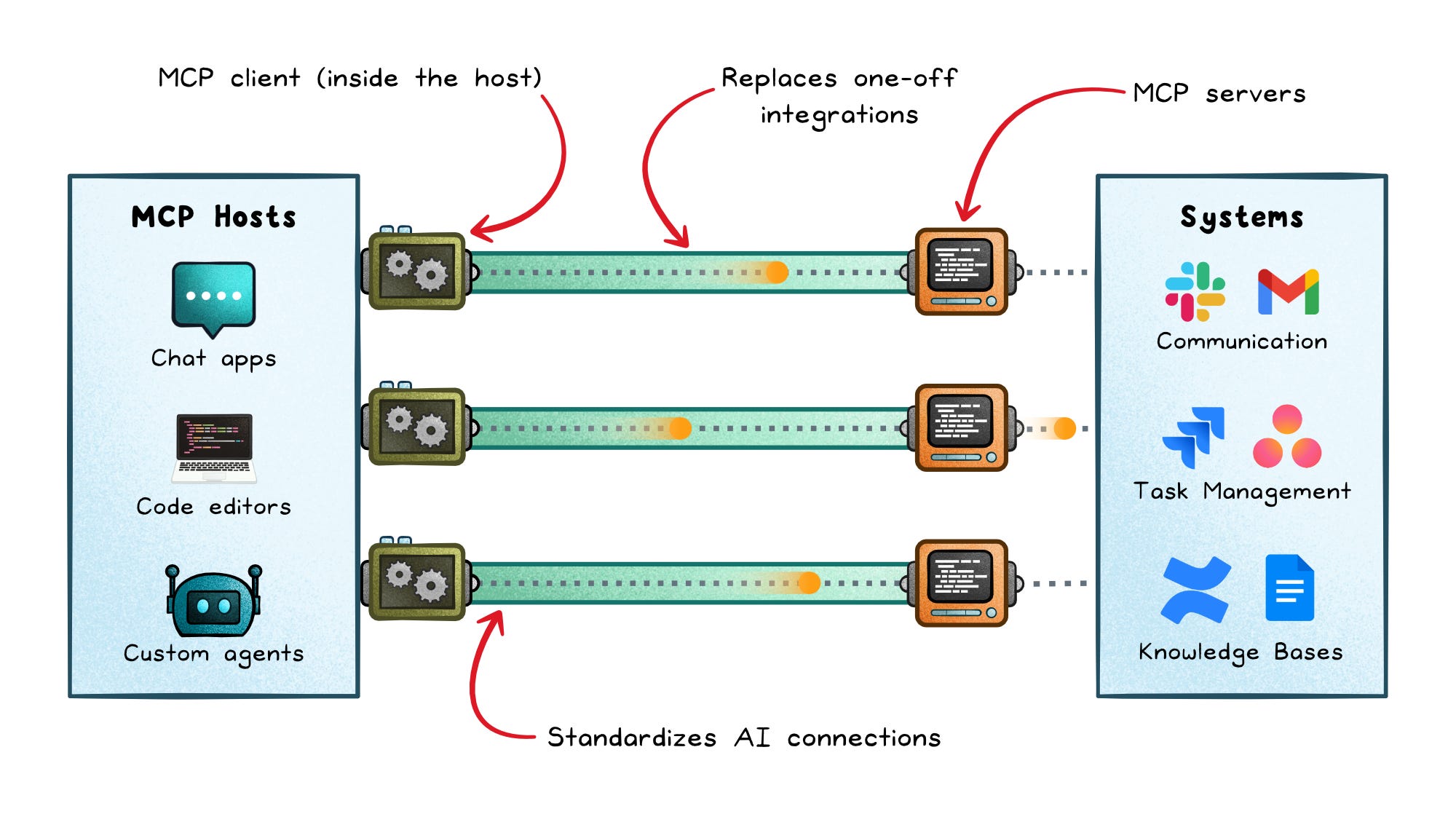
MCP is structured around three core roles:
Host → The AI application the user interacts with, such as a chat app or coding assistant
Client → The connector inside that host that manages one server connection
Server → The external process or service that exposes capabilities to the host
That separation is what makes MCP scale.
The host decides when to ask for help. The client handles the protocol details. The server owns the actual side effects, such as reading data, calling an API, or writing to a system.
How MCP sessions actually work
Under the hood, MCP is a capability protocol with a negotiated lifecycle.
Every connection starts with a handshake where the client and server agree on:
Protocol version → Ensures both sides speak the same language
Capabilities → Defines what features are available in this session
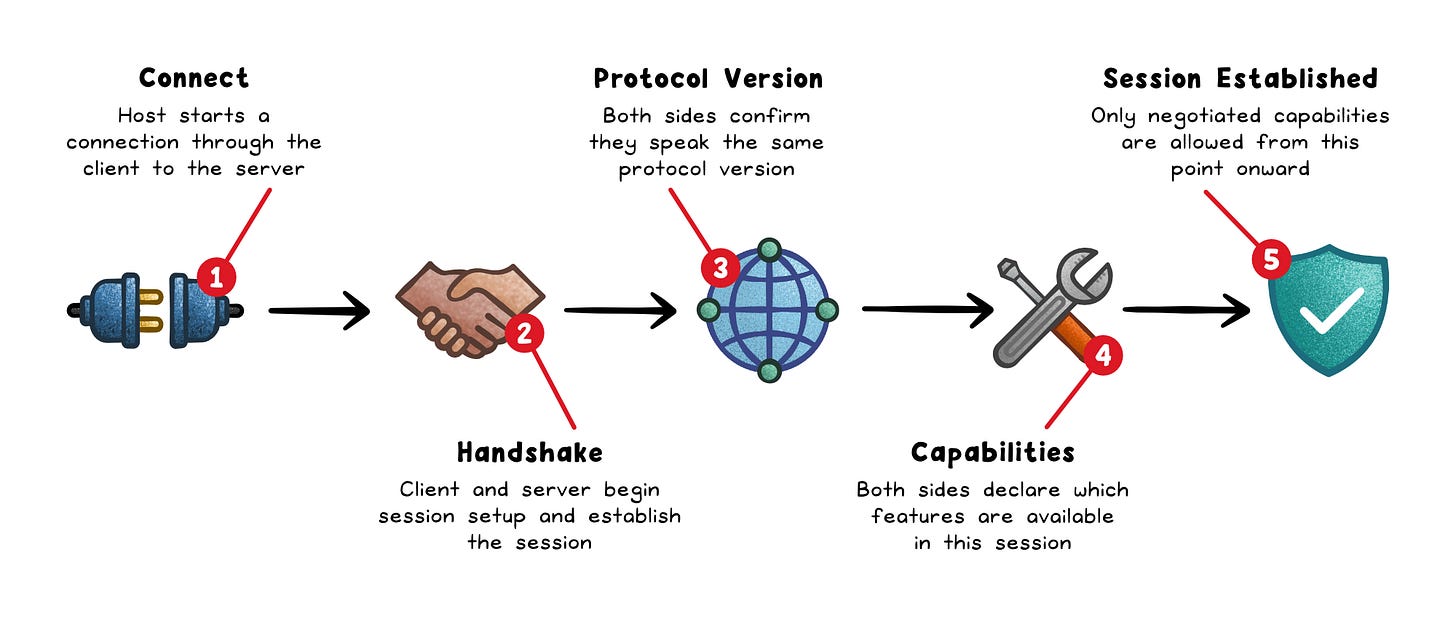
After that, all interactions are constrained by what was agreed upfront. No hidden features. No assumptions.
This is what makes MCP different from typical APIs. It’s not just “send a request, get a response.” It’s a structured session where both sides explicitly agree on what’s possible before anything happens.
That extra layer is what turns MCP from a simple integration pattern into something that can scale across many tools, models, and environments.
What servers expose
MCP servers expose capabilities in three distinct ways. Each one exists for a different job, and mixing them leads to messy systems.
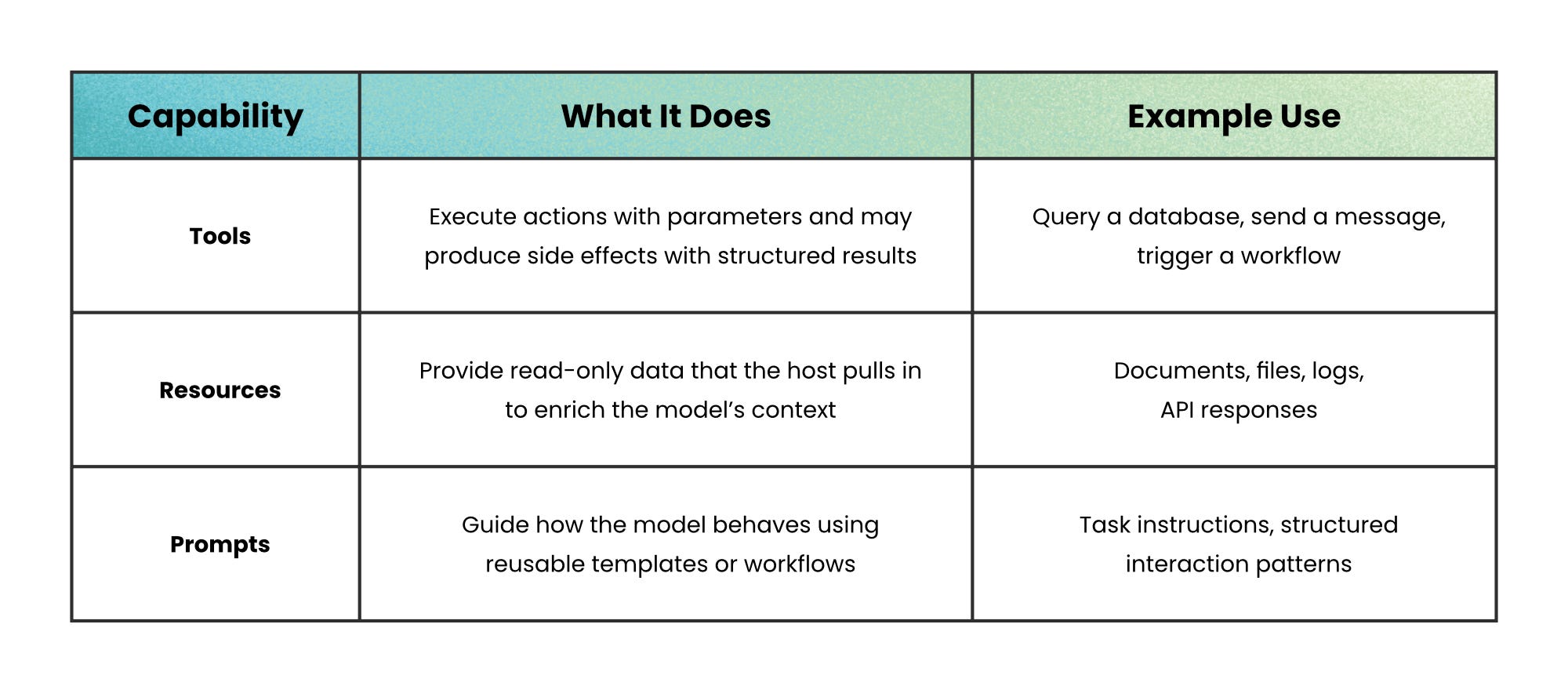
The important distinction is between tools and resources.
If you blur that line, your system becomes harder to reason about.
Use this rule:
Context-heavy → Use a resource because you’re supplying data
Action-oriented → Use a tool because you’re performing something
If a “tool” mostly returns data with no real side effect, it’s probably a resource in disguise.
Keeping this separation clean makes your system easier to test, easier to secure, and easier to evolve.
The benefits of MCP
MCP solves a scaling problem that shows up fast in real AI systems.
Without a shared protocol, every integration becomes custom work. Your chat app talks to one tool one way, your IDE talks to another tool another way, and your internal agent framework invents a third pattern.
That fragmentation slows teams down because every product repeats the same connector logic.
MCP changes that in a few concrete ways:
Standardized integration surface → New tools do not require a brand-new communication pattern each time.
Better separation of concerns → Product logic stays in the host, protocol handling stays in the client, and domain actions stay in the server.
Safer extensibility → Teams can add capabilities gradually because features are negotiated instead of assumed.
Easier composition → One host can connect to multiple servers without turning every connection into a one-off project.
This is especially useful in products where the model needs live context.
A coding assistant may need repository data, documentation, terminal access, and issue tracker actions in the same session. MCP gives those capabilities a shared protocol so the host can compose them without stitching together a fresh protocol per tool.
The tradeoffs
MCP simplifies integration, but it does not remove the hard parts of building safe and reliable systems.
The most common mistake is treating the protocol as the safety layer.
It isn’t.
MCP gives you structure. You still decide what gets exposed, what requires user consent, and how risky actions are controlled. If those decisions are weak, the protocol won’t save you.
That means core distributed-systems discipline still applies:
Check inputs carefully → Don’t assume tool inputs are safe; AI can make mistakes or send bad data
Limit what tools can do → Give each tool only the access it really needs to avoid misuse.
Don’t trust descriptions → Just because a tool says it does something doesn’t make it safe.
Make things easy to track → Use IDs, logs, and progress updates so you can see what’s happening when things get complicated.
Use structured data → Systems are more reliable when they pass clear, well-defined data instead of free-form text.
There is also a system design tradeoff.
MCP standardises communication, but it does not orchestrate behavior.
No model strategy → You still choose which model to use and when
No context ranking → You decide what data is relevant and how it’s selected
No tool arbitration → You define how conflicts between tools are resolved
No workflow control → You design how multi-step tasks are executed
MCP removes the need to rebuild integrations, but it leaves system design decisions exactly where they belong; with you.
When MCP makes sense (and when it doesn’t)
MCP is designed for systems that need to scale across multiple tools, data sources, and workflows.
It works best when your AI application needs to:
Connect to multiple services → Each capability can be exposed and managed independently
Compose workflows → Outputs from one tool feed into another across a session
Evolve over time → New tools can be added without rewriting integrations
Support agent-like behavior → The model dynamically discovers and uses capabilities
In these systems, MCP reduces long-term complexity because integrations become reusable and consistent.
On the other hand, it’s likely overkill when a single, simple API call is all you need.
If your setup is just one model calling one tool with a fixed setup, a direct API call is easier to build, easier to monitor, and cheaper to run.
MCP brings extra layers: like managing versions, handling communication rules, and running supporting infrastructure; which only really make sense once your system starts getting more complex.
Wrapping up
As systems grow, the hardest part isn’t adding intelligence.
It’s making everything work together without breaking.
What starts as a simple integration quickly turns into a web of connectors, assumptions, and edge cases. Over time, that complexity becomes the bottleneck.
MCP addresses that at the foundation level.
It gives you a consistent way to connect systems so you can focus on what those systems should do, not how they talk to each other.
And that shift matters.
Because the teams that move fastest aren’t the ones writing the most integrations.
They’re the ones who can reuse, extend, and evolve what they’ve already built.
That’s the real advantage MCP offers.
👋 If you found this useful → Like + Restack to help others learn system design.
Crushed the Host > Client > Server section.
Very nicely explained using easy to undwratnd english.